Class 17: Third-Party MCP Clients
Duration: ~55 minutes | Level: Intermediate | Prerequisites: Class 16: Guardrails and Budgets, and Claude Desktop installed.
What We'll Cover
- Why Claude Desktop cannot reach the HTTP server on
localhost spring.ai.mcp.server.stdio, and the same tools over a different transport- Keeping standard output clean for the protocol
- Registering it in
claude_desktop_config.json - The same server in Claude Code, and the confirmation dialog it can show
- What deploying it publicly would need instead
This class continues from Class 16 and works only in order-service. If you followed along, keep the project you already have: the new file is application-stdio.yaml, and the other changes are in order-service/pom.xml and Claude Desktop's own configuration file. If you skipped it, clone the class_16 branch to start from the same place:
git clone --branch class_16 https://github.com/the-mcp-guy/spring-ai-mcp-course.git
The walkthroughs use Claude Desktop and Claude Code because this course can demonstrate those two end to end. Nothing in order-service is written for either: a client learns what the server offers by asking it, so any MCP client should connect the same way.
Why Claude Desktop Cannot Use the HTTP Server
order-service serves /mcp at http://localhost:8080, and Claude Desktop cannot use that address. There are two ways to reach an MCP server, and neither accepts a local URL.
Claude Desktop can start the server itself. claude_desktop_config.json holds a command to run, not an address. Claude Desktop launches that program and talks to it through standard input and output. Desktop extensions, the .mcpb bundles on the Extensions page, package that same route: an MCP Bundle is a zip archive holding the server and a manifest.json naming the command that starts it.
A Connector does take a URL. Anthropic's servers open that connection, not your computer, and localhost means whichever machine is asking. So Anthropic's server would look for order-service on itself, where it is not running.
So a server on a developer's machine connects over stdio, the transport we used in Class 9 for the filesystem server. This time order-service is the child process.
The Same Service, Over Stdio
Spring AI can publish the same server over stdio, without a second application. The whole switch is a Spring profile that changes the transport and the logging.
Create order-service/src/main/resources/application-stdio.yaml:
spring:
  ai:
    mcp:
      server:
        stdio: true
        name: order-service
        version: 1.0.0
  main:
    web-application-type: none
    banner-mode: "off"

logging:
  threshold:
    console: OFF
  file:
    name: /tmp/order-service-stdio.log
On Windows: the log file path (click to expand)
/tmp is not a Windows directory. Point the log at one that exists, with forward slashes, which YAML and Java both accept:
logging:
  file:
    name: C:/Users/YOUR-NAME/AppData/Local/Temp/order-service-stdio.log
The troubleshooting section below reads this file, so remember where it went.
The -stdio in the file name ties it to a profile: Spring Boot reads application-stdio.yaml on top of the main application.yaml only when a profile named stdio is active. The --spring.profiles.active=stdio argument in the Claude Desktop configuration further down activates it.
The profile, side by side with an ordinary run:
| Setting | Every class so far, application.yaml | The stdio profile, application-stdio.yaml |
|---|---|---|
| Transport | Streamable HTTP at http://localhost:8080/mcp | standard input and standard output, from stdio: true |
| Web server | Tomcat starts | none, from web-application-type: none, because nothing here serves HTTP requests |
| Spring banner | printed at startup | off, from banner-mode: "off" |
| Application logs | the console appender, on standard output | console threshold OFF |
| Where the logs go | the terminal you started Maven in | /tmp/order-service-stdio.log |
| Who starts the process | you, with mvn spring-boot:run | Claude Desktop, as a child process |
The two tools that take a request context, recheck_shipments and cancel_order, are still registered here, and in Class 15 they were filtered out at startup. What the connection allows decides it:
| Server configuration | The connection to the client | recheck_shipments and cancel_order |
|---|---|---|
protocol: STREAMABLE, Classes 2 to 16 | an HTTP session per client, kept open | registered |
protocol: STATELESS, Class 15 | each call stands alone, so the client cannot be reached mid-call | filtered out at startup |
stdio: true, this class | one child process, one connection for the life of the process | registered |
Keeping standard output clean
A stdio server must not write anything to standard output except protocol messages. Standard output is the channel the protocol travels over, so every byte written there reaches Claude Desktop as part of the JSON-RPC stream.
Under this profile, each stream ends up somewhere different:
The second arrow is the one that breaks the connection. A banner or a System.out.println arrives as malformed JSON-RPC, and Claude Desktop's log then shows a JSON parse error naming invalid JSON, without pointing at the text your own code printed.
That is what the last lines of the profile are for:
banner-mode: "off"stops the Spring banner, the large ASCII Spring logo printed at the top of every startup so far. The quotes keep the value as text: unquoted, YAML readsoffas the booleanfalse. Spring Boot maps that boolean back toBanner.Mode.OFF, so both forms work, and the quoted form sets the mode by name.logging.threshold.console: OFFsilences the console appender. Spring Boot writes its logs through Logback, and an appender is one place Logback sends them. The console appender sends them to standard output, the protocol connection.logging.file.namesends the logs somewhere useful instead.
We use logging.threshold.console instead of setting logging.pattern.console to an empty string. Both silence the output, but the empty pattern makes Logback report an error on startup:
19:11:48,431 |-ERROR in ch.qos.logback.classic.PatternLayout("") - Empty or null pattern.
That line goes to standard error, so it does not corrupt the protocol, but it still puts a confusing line in Claude Desktop's logs.
Because Claude Desktop does not show much detail about a server that failed to start, the log file is where to look when something does not work.
If any code in the application prints to System.out, it must stop here. Class 6's McpInspector and Class 7's CLI both do so, which is one reason they live in support-agent instead of order-service.
Build and Register It
Every class so far has started order-service with mvn spring-boot:run. Claude Desktop launches a jar instead, and mvn package produces a runnable jar only when the Spring Boot plugin is in the module's build. Add it to order-service/pom.xml, inside <project>:
  <build>
    <plugins>
      <plugin>
        <groupId>org.springframework.boot</groupId>
        <artifactId>spring-boot-maven-plugin</artifactId>
      </plugin>
    </plugins>
  </build>
The <plugin> element needs only the group and artifact IDs. spring-boot-starter-parent supplies the version and the repackage execution through pluginManagement, the section of a parent pom that fixes a plugin's version and configuration for every module declaring it. support-agent does not need it, because we always start it with Maven.
mvn -pl order-service -am clean package
That produces two files in order-service/target. The plugin repackages order-service-1.0.0-SNAPSHOT.jar with every dependency inside, and leaves the thin jar, the plain build output holding only our own classes, as order-service-1.0.0-SNAPSHOT.jar.original:
File in order-service/target | Size | Dependencies inside | Main-Class in the manifest | What java -jar does |
|---|---|---|---|---|
order-service-1.0.0-SNAPSHOT.jar | around 60MB | yes | yes | starts, then waits for input on standard input |
order-service-1.0.0-SNAPSHOT.jar.original | a few tens of kilobytes | no | no | fails with no main manifest attribute |
The build still succeeds and produces only the thin jar. Claude Desktop then reports the server as disconnected without saying why.
-pl picks the module, as it has since Class 1. -am is short for --also-make, and it adds whatever order-service depends on inside this repository to the build, so a fresh clone produces the jar in one command.
Then edit claude_desktop_config.json. A fresh install does not have the file yet: open Claude Desktop's Settings, choose Developer, and click Edit Config to create the file and open its folder. On macOS, that is ~/Library/Application Support/Claude/claude_desktop_config.json; on Windows, %APPDATA%\Claude\claude_desktop_config.json, and pasting %APPDATA%\Claude into the File Explorer address bar opens the folder. If the file already lists other servers, add order-service inside the existing mcpServers object.
{
  "mcpServers": {
    "order-service": {
      "command": "java",
      "args": [
        "-jar",
        "/absolute/path/to/order-service/target/order-service-1.0.0-SNAPSHOT.jar",
        "--spring.profiles.active=stdio"
      ]
    }
  }
}
The paths have to be absolute. Each field of the entry:
| Field | Value | What it does | What happens when it is wrong |
|---|---|---|---|
command | java | the program Claude Desktop launches | if java is missing from the PATH Claude Desktop inherited, the launch fails immediately |
args, first | -jar | tells java to run a jar | |
args, second | the absolute path to order-service-1.0.0-SNAPSHOT.jar | picks the repackaged jar | a relative path is resolved against Claude Desktop's own working directory and is not found |
args, third | --spring.profiles.active=stdio | activates application-stdio.yaml | without it Tomcat starts, the banner prints, and the connection fails |
That is the same mcpServers structure we pointed Spring AI at in Class 9, so both Claude Desktop and support-agent read the one format.
Restart Claude Desktop, which means quitting it fully and starting it again: the configuration file is read once, at startup. On macOS, choose Quit from the menu bar or press Cmd+Q. On that restart:
The tools list comes from tools/list, sent once the handshake is done.
On Windows: closing the window is not quitting (click to expand)
Closing the window leaves Claude Desktop running in the system tray, and a window reopened from there still holds the old configuration. Click the arrow at the right end of the taskbar to show hidden icons, right-click the Claude icon, select Quit, then restart the application.
After the restart, click the plus button at the left end of the message box, move the mouse over Connectors, then choose Manage connectors. order-service is listed there with its tools. It can answer:
Look up order ORD-10001 and tell me whether it has shipped.
Claude Desktop calls get_order on a Spring Boot application it started itself, holding an H2 database seeded at startup.
Canceling an order shows how the elicitEnabled() branch from Class 12 behaves with a third-party client. Use ORD-10002, which is seeded as PENDING, because cancel_order accepts only PENDING and PROCESSING orders:
Cancel order ORD-10002.
The service declined the call. It requires its own confirmation step that this client
can't provide, so the cancellation has to be done through the admin console instead.

Order ORD-10002 is still PENDING and unchanged. Everything you'll need there:

Order ID: ORD-10002
Customer: Marcus Adeyemi (CUST-17)
Item: 1 x Mechanical Switch Kit, 34.99

I can still look up orders and check statuses if that's useful, but the cancel and
refund itself will need to happen on your side.
Claude Desktop does not declare the elicitation capability, as of August 2026, so no dialog appears. cancel_order takes its elicitEnabled() branch, declines, and points to the admin console. Claude relays that in its own words, adding the order details from the get_order call it made first.
The Same Server in Claude Code
Claude Code keeps its own list of MCP servers and does not read claude_desktop_config.json. On macOS and Windows Subsystem for Linux (WSL), one command copies the servers across:
claude mcp add-from-claude-desktop
It reads the same file and offers everything in it:
Import MCP Servers from Claude Desktop
Found 5 MCP servers in Claude Desktop.

Please select the servers you want to import:

> [x] my-first-server
  [x] acme-tools
  [x] acme-resources
  [x] acme-prompts
  [x] order-service

Space to select . Enter to confirm . Esc to cancel
A machine with several servers can bring across only the one this class needs.
The scope is chosen on the command line, before the picker appears:
claude mcp add-from-claude-desktop --scope user
Each scope writes somewhere different, and all three survive closing the session:
| Scope | Written to | Who sees it |
|---|---|---|
local, the default | ~/.claude.json, under the entry for the directory you ran it in | you, in that directory only |
user | the top level of ~/.claude.json | you, in every project on the machine |
project | a .mcp.json file in the repository | anyone who clones it, once committed |
claude mcp add adds a server manually, with the same command and arguments as in the Claude Desktop file. claude mcp list shows what is registered, with a health check for each.
Ask it the same thing there, and a question arrives before any tool runs:
> Cancel order ORD-10002.

● I'll load the order-service tools, check the order first, then cancel it.

  Calling order-service...

Tool use

  order-service - Get Order Tool: (MCP)

  orderId: "ORD-10002"

  About the order-service - Get Order Tool:
   Look up a single order by its ID.
   Returns the status, the customer, the line items, the total and the shipment....
  (ctrl+o to expand description)

Do you want to proceed?
> 1. Yes
  2. Yes, and don't ask again for order-service - Get Order commands in /path/to/your/project
  3. No

Esc to cancel . Tab to amend
The text under About is the description we wrote on getOrder in Class 3, so the person sees the same words the model does. The tool it asks about is get_order, because the model looks the order up before cancelling it.
That question comes from Claude Code, not from our server. In its default permission mode, which the CLI labels Manual, Claude Code asks on first use of each tool, and an MCP tool counts even when it only reads. That is why get_order produced one.
Answering "Yes" here does not cancel anything. Claude reads the order, sees that it is PENDING, and then wants cancel_order, which brings the same question up a second time:
● The order is PENDING, so it can be cancelled. Proceeding with the cancellation,
  which starts a refund.

  Calling order-service...

Tool use

  order-service - Cancel Order Tool: (MCP)

  orderId: "ORD-10002"

  About the order-service - Cancel Order Tool:
   Cancel an order and start a refund. The user is asked to confirm before
   anything changes. Only PENDING and PROCESSING orders can be cancelled.

Do you want to proceed?
> 1. Yes
  2. Yes, and don't ask again for order-service - Cancel Order commands in /path/to/your/project
  3. No

Esc to cancel . Tab to amend
The description under About is the one we wrote in Class 12, warning that a confirmation is coming: "The user is asked to confirm before anything changes."
"Yes, and don't ask again" pre-approves cancel_order for that directory from then on, which is a lot of trust for a tool that starts refunds. A server can ask Claude Code to keep asking: set _meta["anthropic/requiresUserInteraction"] to the JSON boolean true on the tool's tools/list entry, and Claude Code prompts on every call, with the "don't ask again" option gone. That is a Claude Code feature and not part of the MCP specification.
Our server does not ask anything until that second Yes. Then this appears:
MCP server "order-service" requests your input

Cancel order ORD-10002 for Marcus Adeyemi? The total is 34.99 and a refund will be started.

> * confirmed: [ ]

  * note: not set

  Accept    Decline

Esc to cancel . Up/Down to navigate . Backspace to unset . Space to toggle
Claude Code drew that form from the elicitation we added in Class 12. Every part comes from our code:
- The heading names the server, so the person can see who is asking.
- The sentence is the one
cancel_orderbuilds, with the order, the customer, and the total filled in. confirmedandnoteare the two components of theCancellationConfirmationrecord. Claude Code read the record's schema and created a form from it: a checkbox for the boolean and a text field for the string.- Accept, Decline and Esc are the three answers the switch handles:
ACCEPT,DECLINEandCANCEL.
The exchange that produced the form:
The third message is the one worth knowing about: our server asks the client a question in the middle of answering the client's tools/call.
The specification puts one hard limit on that form: servers must not use form mode elicitation to ask for passwords, API keys, access tokens or payment credentials, and must use URL mode for those. A confirmation checkbox and a free-text note are what form mode is for.
Press Esc and the tool returns:
Order ORD-10002 was not cancelled: the user dismissed the question.
Tick confirmed, choose Accept, and the cancellation runs:
● The order is PENDING, so it can be cancelled. Proceeding with the cancellation,
  which starts a refund.

  Called order-service

● Order ORD-10002 is cancelled and a refund of 34.99 has been started.

  For reference, the order was in PENDING status (one Mechanical Switch Kit for
  Marcus Adeyemi, 34.99 total), which is one of the two states the service accepts
  for cancellation, the other being PROCESSING.
The sentence in the middle is the tool's own return value, word for word, and anything typed into note reaches orderService.cancel(...). Everything after it is Claude adding context of its own.
Accepting with the box left unticked leaves the order alone, because the code checks the value as well as the action.
One call takes two paths, and elicitEnabled() chooses between them:
Claude Desktop takes the false branch, because it does not declare the elicitation capability.
In Class 8 we said who completion is for: a client meeting our server for the first time, which has to learn what it offers from the server itself. Claude Desktop is such a client.
The prompt sits in that same Connectors menu, under Add from order-service:
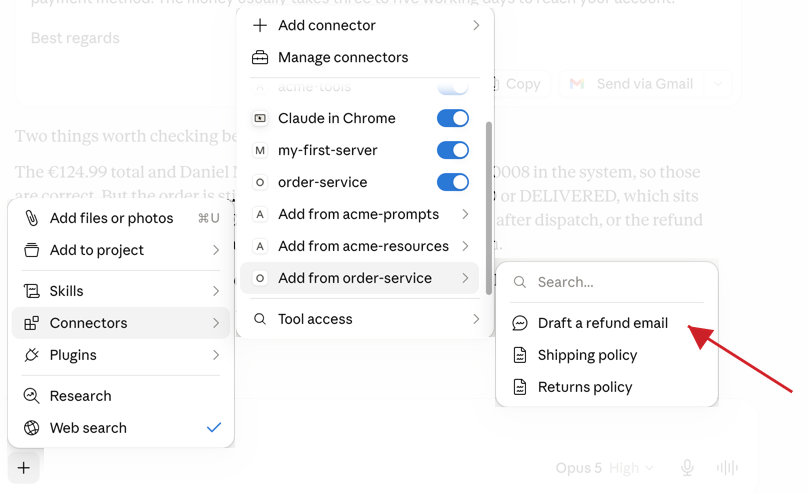
Claude Desktop lists it by its title, Draft a refund email, where the protocol name is draft_refund_email. The two entries below it, Shipping policy and Returns policy, are the resources from Class 4, in the same menu and also under their titles.
Choosing the prompt opens a form:
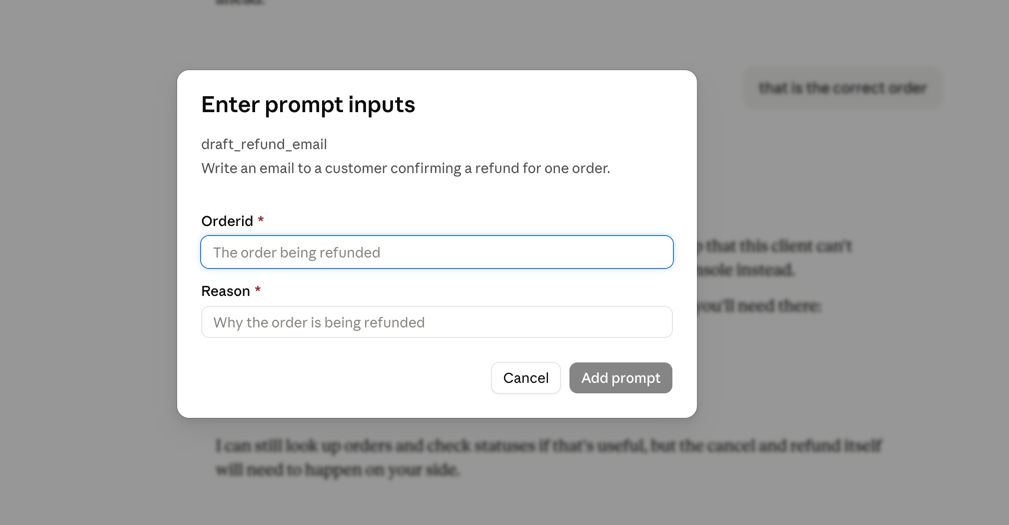
Every word in that form comes from the annotations written in Class 5. The line under the name is the @McpPrompt description. The two labels are the argument names. The grey text inside each box is the @McpArg description. The red asterisks are required = true.
Filling it in produces the email:
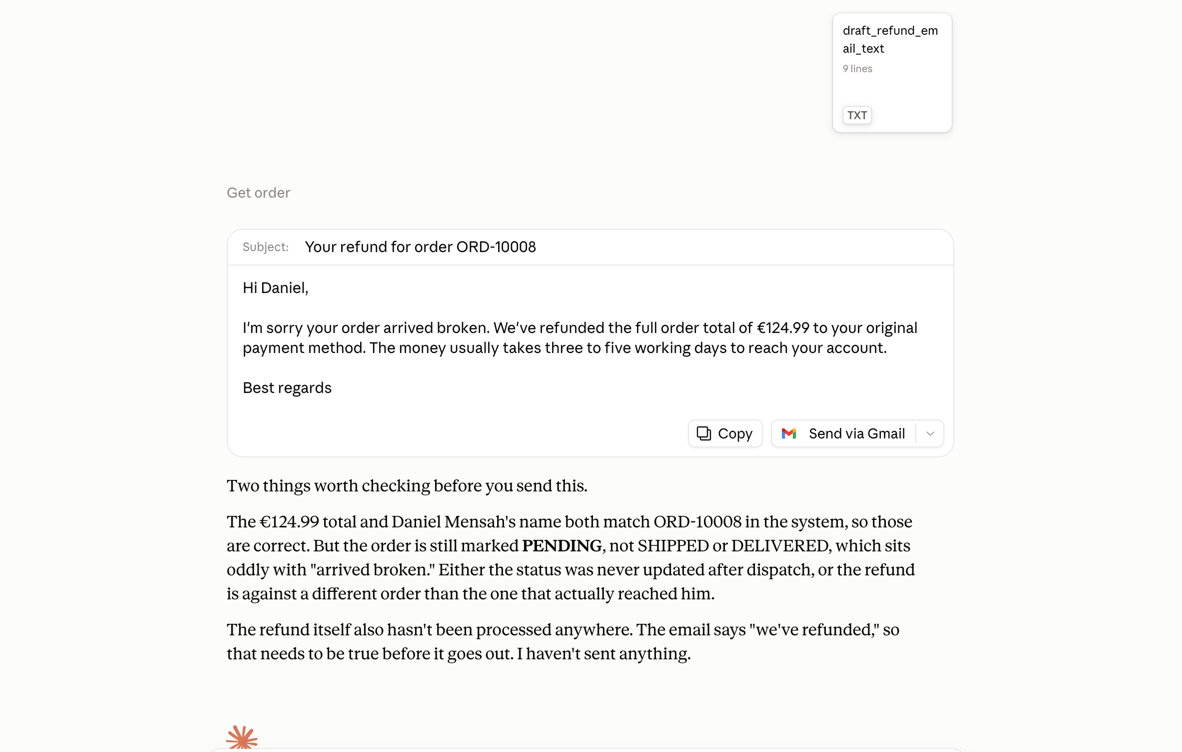
After drafting it, the model checked the email against the order, saw it was still PENDING, and said that no refund had been processed. That was correct: draft_refund_email produces text for a person to read and does not change the database. cancel_order is the tool that starts a refund.
Whether the orderId field suggests our order IDs as you type depends on the client's completion support. If it does, Claude Desktop sends the completion/complete request from Class 5, and our handler answers with order IDs from the database.
When the server does not appear
Check Claude Desktop's own logs. It writes them to ~/Library/Logs/Claude (%APPDATA%\Claude\logs on Windows): mcp.log for connection failures, mcp-server-order-service.log for everything order-service wrote to standard error. A process that died before Logback opened its own file still leaves something here:
tail -n 20 -f ~/Library/Logs/Claude/mcp*.log
Check the server's own log file. /tmp/order-service-stdio.log (or the Windows path chosen above) has the startup failure if the application got far enough to write one.
Check java is on the PATH Claude Desktop sees. The PATH is the list of directories the operating system searches for a command given by name alone, and every process carries its own copy. A terminal builds its copy from the shell's startup files; Claude Desktop is launched from its icon, so its copy may leave out the directory holding java. Put the absolute path that which java prints (where.exe java in PowerShell) into the command field instead of the bare name.
Check that nothing is printing to stdout. Run the jar by hand and look:
java -jar order-service/target/order-service-1.0.0-SNAPSHOT.jar --spring.profiles.active=stdio
It should start and wait for input without printing anything. Anything on the screen is something Claude Desktop would receive as a protocol message.
The Database Question
Each launch is a new process with a fresh in-memory H2 database seeded by DataInitializer. If an order is canceled and Claude Desktop is quit, the next launch re-seeds the data, and the cancellation is lost.
For the course that is fine, but a real service needs its data to survive a restart, which means keeping it outside the process. An external database such as PostgreSQL does that, starting with the datasource URL:
spring:
  datasource:
    url: jdbc:postgresql://localhost:5432/orders
The URL alone does not complete the switch. Three more things change:
| What | Now | For PostgreSQL |
|---|---|---|
| JDBC driver | H2, the only one on the classpath | add org.postgresql:postgresql to order-service/pom.xml |
| Credentials | the in-memory database opens without credentials | a username and password |
spring.jpa.hibernate.ddl-auto | create-drop, which drops the tables when the process stops | validate or none, with the schema managed outside the application |
Those credentials belong in the env object of the same claude_desktop_config.json entry, which passes them to the server as environment variables and keeps them out of the repository. That is where the specification tells stdio servers to look.
A stdio server is a process per client, so several clients mean several servers against one database. Anything cached in memory is per-client, and writes need the same care as in any service running more than one instance.
The Remote Alternative
Stdio suits a server on one person's machine. A server a whole team uses runs on a shared host over HTTP, the Streamable HTTP setup from every class before this one, plus two things this course has not covered. The Encryption and Authentication rows name them:
| What | stdio, this class | Streamable HTTP on a shared host |
|---|---|---|
| Who starts the process | Claude Desktop, one per client | you, once, on the host |
| Who can reach it | only the person whose machine it runs on | anyone who can reach the URL |
| Encryption | nothing crosses a network | TLS |
| Authentication | the operating system account | OAuth 2.1 access tokens |
| Database | one in-memory H2 per process | one shared database, outside the process |
The first is TLS, short for Transport Layer Security, which encrypts traffic between the client and the server because that traffic includes customer names and order totals.
The second is authorization. If /mcp is published on the internet and requests are not authenticated, anyone can call update_order_status and cancel_order, and the Spring AI starters do not stop them: the HTTP transports "expose an unauthenticated JSON-RPC endpoint by default". MCP builds authorization on OAuth 2.1, a standard in which a client first obtains an access token, a credential proving it may call the service, and then sends that token with every request. Protected resource metadata (RFC 9728) is how a client without a token learns where to get one:
The first four messages are the discovery: the 401 points at the metadata document, and the metadata names the authorization server. The specification makes all of this optional and applies it to HTTP transports only, asking stdio servers to take credentials from the environment instead.
On the Spring side, the MCP Security module puts an OAuth 2.0 resource server in front of the endpoint and lets @PreAuthorize guard individual tool methods:
<dependency>
  <groupId>org.springaicommunity</groupId>
  <artifactId>mcp-server-security</artifactId>
</dependency>
Spring AI calls that module work in progress and "not officially endorsed yet by Spring AI or the MCP project", so check which Spring AI version it supports first.
TLS and authorization still leave one requirement. A Connector's connection comes from Anthropic's servers, so the host has to be reachable over the public internet from their addresses: a server behind a VPN or a firewall does not connect, even when you can reach it yourself. With all three, Claude Desktop reaches it as a Connector, and so does anything else that speaks the protocol.
What We Built
The order service runs inside Claude Desktop, launched as a child process, with the same tools, resources and prompt that support-agent uses over HTTP. Two things changed: the stdio profile, which switches the transport and moves the logs out of standard output, and the Spring Boot plugin that makes the jar runnable.
The Course, End to End
The course started from a Spring Boot application with a REST controller, before any AI was involved. What the application has now:
- Tools: six of them, with generated schemas, behavioral hints, descriptions, and errors written for a model
- Resources: the policies as fixed resources, orders as a template
- A prompt: the refund email, with order-ID completion
- A client:
support-agent, connected to three servers over two transports, filtering and renaming what it receives - Two-way traffic: progress and log messages during a long job, and a confirmation before anything is cancelled
- Tests: without calling a model
- Guardrails: an advisor that refuses a request before it reaches the model, and a token budget enforced by an advisor we wrote ourselves
- Two transports: Streamable HTTP for
support-agent, stdio for Claude Desktop
None of this required rewriting the business logic. OrderService, the class that finds and updates orders, changed once in the whole course: in Class 12 we made updateStatus refuse a CANCELLED status. That is a rule we wanted every caller to obey, including the REST controller, which is why it lives in the service.
The MCP side was added by describing what the application already did: annotations named the tools, the resources and the prompt, configuration chose the transports, and Spring AI turned that into the MCP surface a client sees.
The finished project, with every class applied, is on the completed branch:
git clone --branch completed https://github.com/the-mcp-guy/spring-ai-mcp-course.git
Further Reading
- MCP specification: Transports: the normative stdio rules behind this class, including the ban on writing anything to standard output that is not a valid MCP message.
- Connect to local MCP servers: the
claude_desktop_config.jsonformat, its location on macOS and Windows, and the Claude Desktop log files. - MCP Server Boot Starters: Spring AI's page for
spring.ai.mcp.server.stdio=true, next to the warning that the HTTP transports expose an unauthenticated endpoint. - Get started with custom connectors using remote MCP: why a Connector cannot reach
localhost, written from the side that opens the connection. - Connect Claude Code to tools via MCP: the import command, the three scopes and the file each one writes.
- Spring Boot Maven Plugin: Packaging Executable Archives: why the plugin declaration can leave out the version under
spring-boot-starter-parent, and why the thin jar is left behind as.original. - MCP specification: Authorization: the OAuth 2.1 and RFC 9728 flow the last section shows, and the rule that stdio servers take credentials from the environment.
- Securing the MCP Server: the Spring side of that, through the community
mcp-server-securitystarter and@PreAuthorizeon tool methods. - MCP specification: Elicitation: the three response actions the switch handles, and the rule that keeps passwords and payment details out of form mode.
Sources
- MCP specification: Transports: that a stdio server must not write anything to standard output that is not a valid MCP message, may log to standard error, and runs as a subprocess the client launches.
- Connect to local MCP servers: the
claude_desktop_config.jsonfields and locations, the Settings then Developer then Edit Config path, the absolute-path requirement, the Connectors menu, and themcp.logandmcp-server-SERVERNAME.logfiles. - MCP Server Boot Starters: that
spring.ai.mcp.server.stdio=trueselects the stdio transport, and that the HTTP transports expose an unauthenticated JSON-RPC endpoint by default. - Common Application Properties:
logging.threshold.consoleas the log level threshold for console output. - Get started with custom connectors using remote MCP: that a Connector's connection comes from Anthropic's servers, and that the server has to be reachable over the public internet.
- Spring Boot Maven Plugin: Packaging Executable Archives: that
spring-boot-starter-parentpre-configures therepackageexecution, and that the non-executable artifact is renamed to.original. - Maven CLI Options Reference: that
-plis--projectsand-amis--also-make, which also builds the projects the list requires. - Connect Claude Code to tools via MCP: that
claude mcp add-from-claude-desktopworks on macOS and Windows Subsystem for Linux, the local, user and project scopes and their files, the health check inclaude mcp list, and the_meta["anthropic/requiresUserInteraction"]flag. - Configure permissions (Claude Code): that the default permission mode, labelled Manual, prompts on first use of each tool.
- MCP specification: Elicitation: the
accept,declineandcancelactions, Escape producingcancel, and the ban on form mode for secrets. - MCP specification: Authorization: that MCP authorization builds on OAuth 2.1 and RFC 9728, is optional, and tells stdio implementations to take credentials from the environment.
- RFC 9728: OAuth 2.0 Protected Resource Metadata: the metadata document a client reads to find the authorization server for a protected resource.
- Securing the MCP Server: the community
mcp-server-securitymodule, and Spring AI's own note that it is not officially endorsed yet by Spring AI or the MCP project. - MCP Bundles: that
.mcpbfiles are zip archives holding a local MCP server and amanifest.jsondescribing it.