Class 1: Environment Setup
Duration: ~20 minutes | Level: Beginner | Prerequisites: JDK 17+ installed (JDK 21 recommended), basic Maven knowledge
This course is built on the Java MCP SDK 2.0.0, which is what the companion pom.xml pins on every class branch, and which implements protocol revision 2025-11-25. The current patch release is 2.0.1, from 19 August 2026, and it implements the same revision. Every piece of code here targets that revision, because it is the revision the SDK can run.
The current specification is 2026-07-28, ratified 28 July 2026, and it changed the protocol substantially. It calls revisions up to 2025-11-25 legacy and 2026-07-28 and later modern. Four of the mechanisms you will learn here belong to the legacy era:
| What this course teaches | What 2026-07-28 does with it |
|---|---|
the initialize and notifications/initialized handshake (Class 4) | removed. Every request carries its own protocol version and client capabilities in _meta, a metadata field on the request itself |
resources/subscribe (Class 4) | removed. A client calls subscriptions/listen once to open a long-lived stream, and opts in to the notification types it wants |
the Mcp-Session-Id header (Class 9) | removed. The protocol does not define sessions |
an endpoint answering GET as well as POST (Class 9) | removed. The endpoint answers POST only, and a modern-only server should return 405 to a GET |
ping, logging/setLevel and notifications/roots/list_changed were removed in the same revision. Roots, Sampling and Logging were deprecated: the features that let a server ask the client which directories it may read, ask it for a model completion, and send it log messages.
The Java SDK has yet to ship the new revision, deployed servers overwhelmingly still speak the old one, and a 2025-11-25 server is what you can build and run today. This course teaches the legacy era on purpose. Each class flags the change where it matters, and MCP Fundamentals teaches the modern protocol on its own terms.
Why Java 17+ (and 21 Recommended)?
The Java MCP SDK requires Java 17 as a minimum, and its classes are compiled to Java 17 bytecode. It uses these language features:
- Records: for immutable data classes (tool results, resource content); available in 17
- Pattern Matching for
instanceof: concise, safe type checks when reading tool arguments and content (e.g.arg instanceof String text); available in 17 - Text Blocks: for JSON schema definitions and tool descriptions; available in 17
The SDK's asynchronous work runs on Project Reactor, a library for composing operations over streams of values. reactor-core is a compile-scope dependency of mcp-core, and much of the SDK is written against Reactor's Mono. The SDK does not use virtual threads.
We recommend 21 for two reasons. LTS stands for Long Term Support: Eclipse Adoptium supports each LTS release for at least four years, so 21 has free production builds until at least December 2029. Java 21 is also where virtual threads arrived, so your own code can use them.
| Java release | GA | LTS | What it adds that matters here | Where it stands in this course |
|---|---|---|---|---|
| 17 | 14 September 2021 | yes | records, pattern matching for instanceof, text blocks | the SDK's minimum, and what its bytecode targets |
| 21 | 19 September 2023 | yes | virtual threads, available to your own code | what this course uses, and what maven.compiler.release is set to below |
| 25 | 16 September 2025 | yes | the current LTS | fine to install, and nothing in this course depends on it |
If you stay on 17, change maven.compiler.release in the pom.xml below to 17. javac refuses a release number higher than the JDK running it, and stops with error: release version 21 not supported.
Verify Your Java Installation
java -version
# Expected: openjdk version "21.0.x" (or 17.0.x at minimum)

javac -version
# Expected: javac 21.0.x (or 17.0.x at minimum)
If you see an older version, install a current JDK from Adoptium, which publishes free, production-quality Eclipse Temurin builds.
Create a Maven Project
Create a new Maven project in your IDE. In IntelliJ IDEA that is File → New → Project:
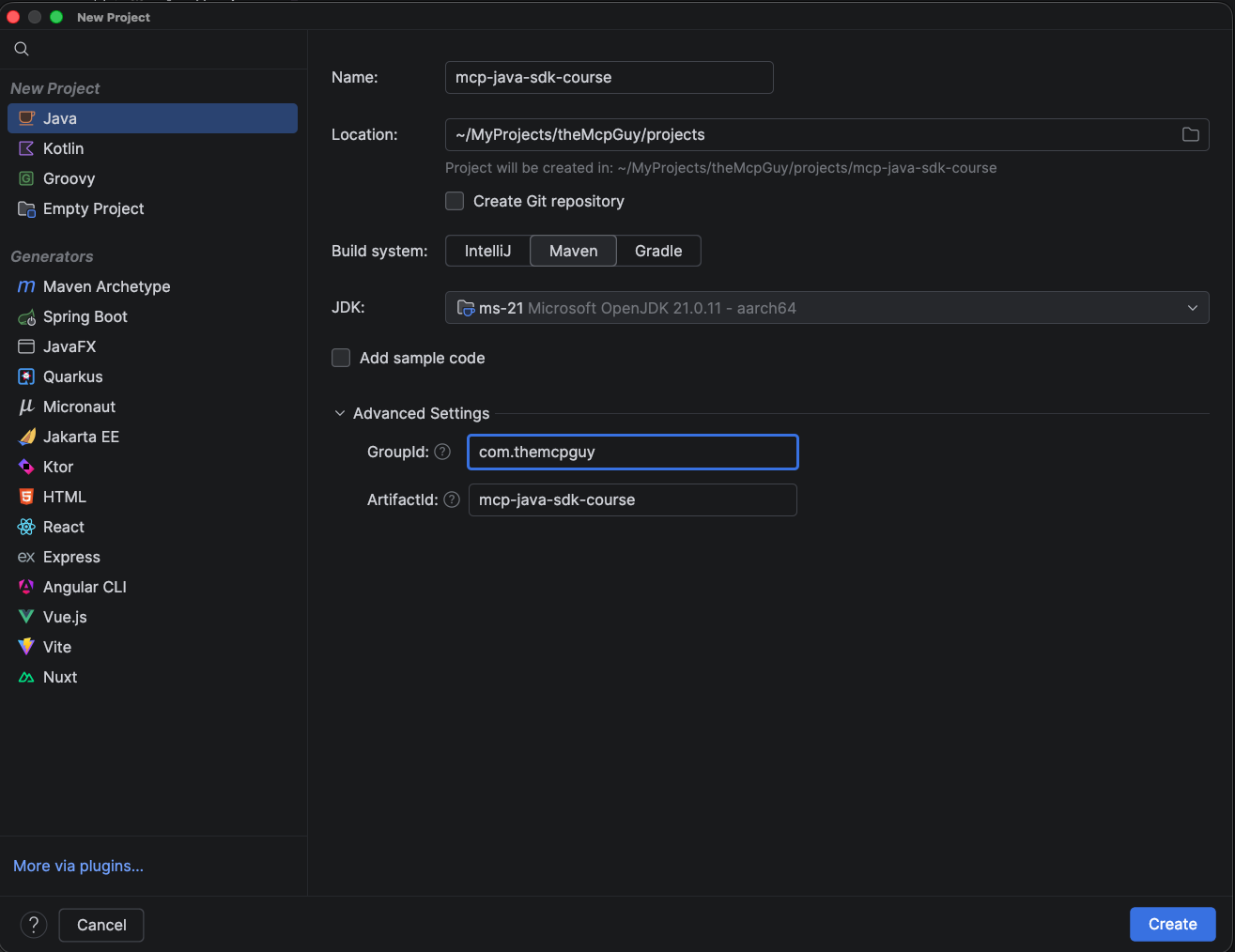
Four of those settings matter:
- Build system: Maven.
- JDK: 21. Anything from 17 works.
- Add sample code: unchecked. Ticking it generates an
App.javaand anAppTest.javathat this course leaves unused. - GroupId
com.themcpguy, ArtifactIdmcp-java-sdk-course. That is our namespace, so the code here lines up with the companion project. Use your own if you prefer, and adjust the package declarations in the snippets that follow.
Prefer not to use an IDE? Create pom.xml and src/main/java/com/themcpguy/ yourself. Nothing below depends on the IDE.
Add the MCP Java SDK dependency
Replace the generated pom.xml with this complete file:
<?xml version="1.0" encoding="UTF-8"?>
<project xmlns="http://maven.apache.org/POM/4.0.0"
         xmlns:xsi="http://www.w3.org/2001/XMLSchema-instance"
         xsi:schemaLocation="http://maven.apache.org/POM/4.0.0 http://maven.apache.org/xsd/maven-4.0.0.xsd">
  <modelVersion>4.0.0</modelVersion>

  <groupId>com.themcpguy</groupId>
  <artifactId>mcp-java-sdk-course</artifactId>
  <version>1.0.0-SNAPSHOT</version>

  <properties>
    <!-- `release` is what the compiler actually honours; setting `source`/`target`
         alongside it does not affect anything. -->
    <maven.compiler.release>21</maven.compiler.release>
    <project.build.sourceEncoding>UTF-8</project.build.sourceEncoding>
  </properties>

  <dependencies>
    <!-- MCP Java SDK 2.0.0 is GA, meaning generally available. The older 1.1.x line
         is still patched: 1.1.4 shipped on the same day as the 2.0.1 patch.
         The bundled `mcp` artifact pulls in mcp-core plus mcp-json-jackson3, which uses
         Jackson 3's `tools.jackson` packages. We take mcp-core with mcp-json-jackson2
         instead, so you get the familiar `com.fasterxml.jackson` ObjectMapper. -->
    <dependency>
      <groupId>io.modelcontextprotocol.sdk</groupId>
      <artifactId>mcp-core</artifactId>
      <version>2.0.0</version>
    </dependency>
    <dependency>
      <groupId>io.modelcontextprotocol.sdk</groupId>
      <artifactId>mcp-json-jackson2</artifactId>
      <version>2.0.0</version>
    </dependency>

    <!-- Logging (SLF4J + Logback) -->
    <dependency>
      <groupId>ch.qos.logback</groupId>
      <artifactId>logback-classic</artifactId>
      <version>1.5.38</version>
    </dependency>

    <!-- Used from Class 7 onwards -->
    <dependency>
      <groupId>org.junit.jupiter</groupId>
      <artifactId>junit-jupiter</artifactId>
      <version>5.14.4</version>
      <scope>test</scope>
    </dependency>
  </dependencies>

  <build>
    <plugins>
      <!-- Builds a runnable fat JAR: one JAR with every dependency copied inside it,
           so it does not need anything else on the classpath. It is what Claude Desktop launches. -->
      <plugin>
        <groupId>org.apache.maven.plugins</groupId>
        <artifactId>maven-shade-plugin</artifactId>
        <version>3.6.2</version>
        <executions>
          <execution>
            <phase>package</phase>
            <goals><goal>shade</goal></goals>
            <configuration>
              <transformers>
                <transformer implementation="org.apache.maven.plugins.shade.resource.ManifestResourceTransformer">
                  <mainClass>com.themcpguy.HelloMcpServer</mainClass>
                </transformer>
                <!-- The SDK finds its JSON mapper through META-INF/services. This
                     transformer merges those files as it shades, so one JAR's copy
                     does not overwrite another's. -->
                <transformer implementation="org.apache.maven.plugins.shade.resource.ServicesResourceTransformer"/>
              </transformers>
            </configuration>
          </execution>
        </executions>
      </plugin>
    </plugins>
  </build>
</project>
These versions were checked on Maven Central on 4 September 2026. The SDK moves quickly, so check again before starting a new project. The SDK quickstart also publishes an mcp-bom, which pins every SDK artifact to one release so the two versions above cannot drift apart.
Install Claude Desktop
For development, Claude Desktop is the easiest MCP host to use. A host is the application that starts MCP servers and puts their tools in front of a model. It runs both kinds of server: stdio servers, which it starts as a subprocess and talks to over standard input and output, and HTTP servers, which it reaches over the network. It shows when a tool is called.
Download it from claude.ai/download and log in. A free account is enough.
Open the config file
Claude Desktop keeps its MCP servers in a JSON file.
Open Settings from the Claude menu in the macOS menu bar. This is not the settings inside the Claude window, which does not have what you need:
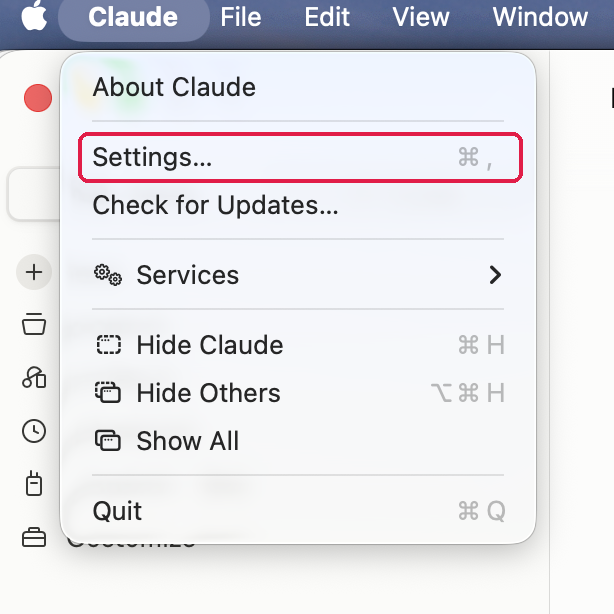
Then pick Developer in the sidebar and click Edit Config. That creates claude_desktop_config.json if you do not have one yet, and opens it in your editor:
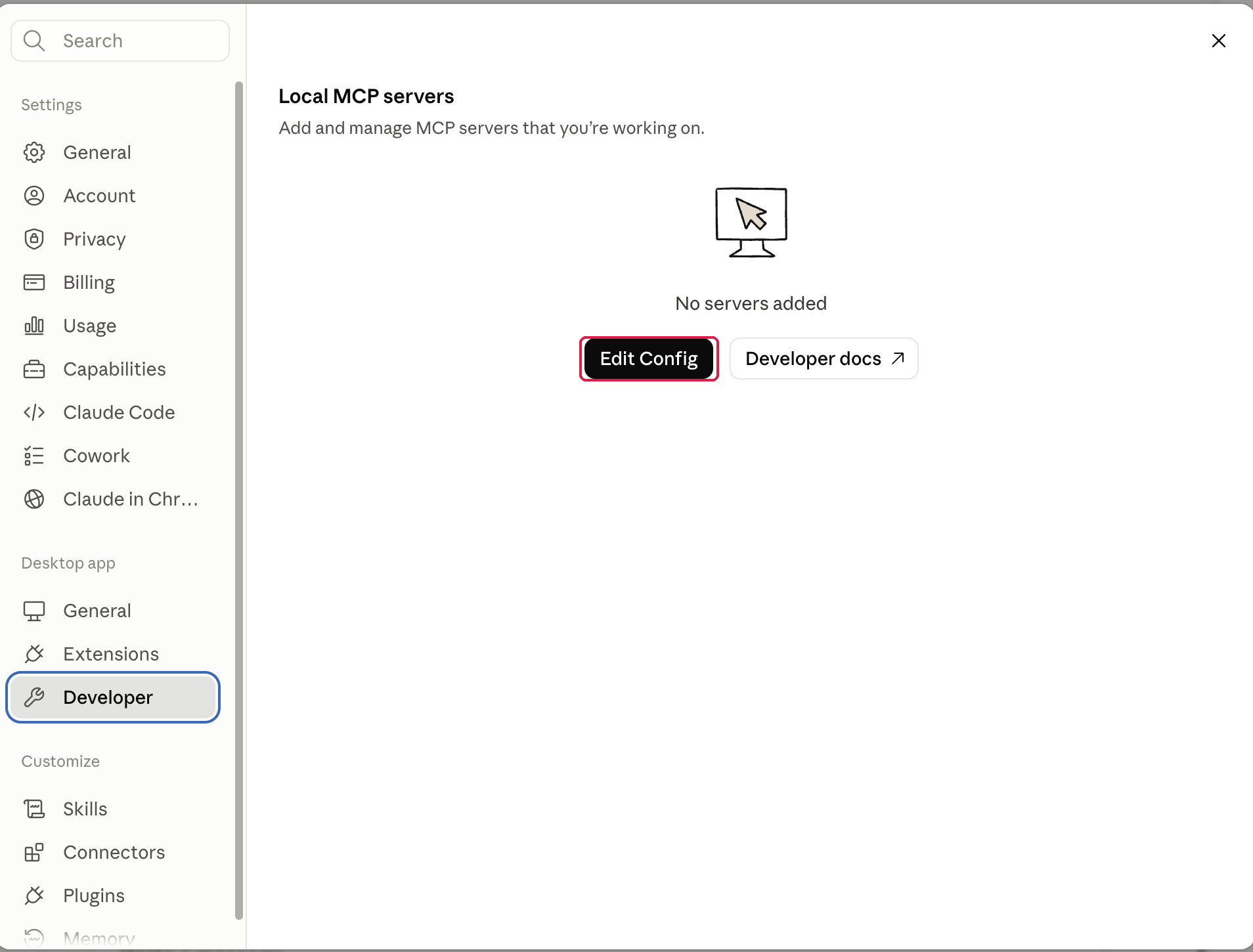
"No servers added" is what you should expect to see. You are about to add the first one.
Point it at your server
The file lives here:
| Operating system | Path to claude_desktop_config.json |
|---|---|
| macOS | ~/Library/Application Support/Claude/claude_desktop_config.json |
| Windows | %APPDATA%\Claude\claude_desktop_config.json |
Create or edit this file:
{
  "mcpServers": {
    "my-first-server": {
      "command": "java",
      "args": ["-jar", "/absolute/path/to/mcp-java-sdk-course/target/mcp-java-sdk-course-1.0.0-SNAPSHOT.jar"],
      "env": {}
    }
  }
}
Use the absolute path to your JAR file. The env object passes environment variables (database URLs, API keys) to your server process. That file is plain text, so anything in env can be read by any process running as you. Class 8 comes back to this file, and to the credentials a stdio server takes from its environment.
Write Your First Class
Create src/main/java/com/themcpguy/HelloMcpServer.java:
package com.themcpguy;

import io.modelcontextprotocol.server.McpServer;

public class HelloMcpServer {

    public static void main(String[] args) {
        System.out.println("MCP SDK available: " + McpServer.class.getName());
    }
}
So far it only shows that the SDK is on your classpath: if McpServer resolves, Maven found the dependency. The next class fills this file in with a real server.
Build and run it:
mvn package
java -jar target/mcp-java-sdk-course-1.0.0-SNAPSHOT.jar
MCP SDK available: io.modelcontextprotocol.server.McpServer
That one line confirms the JDK compiled your code, Maven resolved the SDK, and the shade plugin wrote a manifest pointing at the right main class. The diagram below traces that JAR from mvn package to the two things that launch it:
The last two arrows carry the same command: Claude Desktop starts your server exactly as you just did, at the path you write into claude_desktop_config.json.
package and not clean install?mvn clean install is the reflex for many Java developers. It works, and does more than this project needs. Each word is a step in Maven's build lifecycle:
| Command | What it runs | When you need it in this course |
|---|---|---|
mvn package | compile, run the tests, jar, shade | every class, because you launch the JAR by its path on disk |
mvn install | everything package does, then copies the JAR into your local repository at ~/.m2/repository | only when another project on your machine depends on this one, which is why the multi-module companion projects use it |
mvn clean | deletes target/ before anything else runs | when you have renamed or deleted a class and suspect a stale .class file, at the cost of a full rebuild |
Use package while working through these classes.
If the import does not resolve, run mvn dependency:tree | grep modelcontextprotocol. You should see mcp-core and mcp-json-jackson2, both at 2.0.0. Empty output means Maven failed to download the dependencies. The usual causes are a typo in the groupId, artifactId or version you pasted into pom.xml, or a proxy or firewall blocking Maven Central.
On Windows: the same check without grep (click to expand)
A default Windows shell does not have grep. Use findstr:
mvn dependency:tree | findstr modelcontextprotocol
This command was not run on Windows.
Logging Configuration
Create src/main/resources/logback.xml:
<configuration>
  <appender name="STDERR" class="ch.qos.logback.core.ConsoleAppender">
    <target>System.err</target>
    <encoder>
      <pattern>%d{HH:mm:ss} [%thread] %-5level %logger{36} - %msg%n</pattern>
    </encoder>
  </appender>
  <root level="INFO">
    <appender-ref ref="STDERR" />
  </root>
</configuration>
With stdio transport, the host reads stdout as a stream of MCP protocol messages, one JSON-RPC message per line. Any log line written there corrupts that stream. Logback's ConsoleAppender writes to System.out unless you tell it otherwise, which is what the <target>System.err</target> line above does.
Your server's two output streams go to different readers:
A System.out.println you add while debugging goes into the same stream as the protocol messages, so the rule covers your own printing too.
The Companion Code
Every class in this course has a matching branch in the companion repository, with code that compiles and runs. This class is the class_1 branch: exactly what you have just built.
git clone --branch class_1 https://github.com/the-mcp-guy/mcp-java-sdk-course.git
Typing the code out yourself is where most of the learning happens, so use the branch when something will not compile and you want to compare it with a working version. Each branch contains only the code from its own class.
Project Structure
Your project now looks like this:
mcp-java-sdk-course/
├── pom.xml
└── src/
    └── main/
        ├── java/
        │   └── com/themcpguy/
        │       └── HelloMcpServer.java
        └── resources/
            └── logback.xml
What's Next
In the next class we write your first MCP server, a minimal one that advertises its capabilities, responds to tool calls, and connects to Claude Desktop. A server's capabilities are the MCP features it tells the client it supports.
→ Class 2: Your First MCP Server
Further Reading
- MCP Java SDK: Quickstart: the official dependency table behind this class's
pom.xml, including why mcp-core plus mcp-json-jackson2 is the Jackson 2 combination, and whatmcp-bomgives you instead of hand-pinned versions. - Specification 2025-11-25: Transports: the normative stdio rules that
logback.xmlexists to satisfy, including the rule that a server must not write anything tostdoutthat is not a valid MCP message. - Introduction to the Build Lifecycle: the phase order behind the
packageversusinstalltable, and which goals run at each phase. - Apache Maven Shade Plugin: Executable JAR: how
ManifestResourceTransformerwrites theMain-Classentry that letsjava -jarand Claude Desktop start the same file. - JEP 444: Virtual Threads: the Java 21 feature described by the people who built it, so you can judge for yourself what it changes in your own code.
- Specification 2026-07-28: Key Changes: the full list behind the four rows in the opening table, including the removals that table leaves out.
- Connect to local MCP servers: Anthropic's own walkthrough of the Settings, Developer, Edit Config path used above.
Sources
- mcp-core on Maven Central: that
2.0.1is the current SDK release, and that 1.1.4 patches the older 1.1.x line. - MCP Java SDK documentation: that the Java SDK documents itself against protocol revision
2025-11-25. - McpServer, Java MCP SDK Core 2.0.0 API: the fully qualified class name that
HelloMcpServerimports and prints. - Versioning: that
2026-07-28is the current protocol revision. - Specification 2026-07-28: Versioning and Compatibility: the legacy and modern terminology, and which revisions fall in each era.
- Specification 2026-07-28: Key Changes: the four removals in the opening table, the removal of
ping,logging/setLevelandnotifications/roots/list_changed, and the Roots, Sampling and Logging deprecations. - Specification 2026-07-28: Streamable HTTP: that a modern-only server should answer a
GETwith405 Method Not Allowed. - The 2026-07-28 Specification: the 28 July 2026 ratification date, and which SDKs have shipped the revision.
- Specification 2025-11-25: Transports: the stdio rules for
stdoutandstderrthat the logging section depends on. - JDK 17, JDK 21 and JDK 25 project pages: the GA dates in the Java release table.
- JEP 395: Records: that records were finalised in JDK 16, so they are available in 17.
- Eclipse Temurin: Release information and support roadmap: that Adoptium supports each LTS for at least four years, and Java 21 until at least December 2029.
- Setting the -release of the Java Compiler: what
maven.compiler.releasedoes, and whensourceandtargetare passed instead. - Apache Maven Shade Plugin: Resource Transformers: that
ServicesResourceTransformermergesMETA-INF/servicesentries when shading. - Logback: Console and File appenders: that
ConsoleAppender's target acceptsSystem.outorSystem.errand defaults toSystem.out. - Get started with custom connectors using remote MCP: that a free Claude account can use MCP, with one custom remote connector.
- Connect to local MCP servers: the
claude_desktop_config.jsonpaths on macOS and Windows, and the Settings to Developer to Edit Config path.